10 Best USB Microphones for Streamers in 2026
A stream can have sharp gameplay, a clean webcam feed, and a great overlay, but viewers will still leave if your voice sounds distant, noisy, or buried under keyboard clicks. The best USB microphones streamers can buy solve that problem without forcing you to build a complicated audio setup. Plug one into your PC, set the right gain, and your voice can immediately sound more focused and professional.
For most gamers and creators, a USB microphone is the smart upgrade. It skips the extra interface, XLR cables, and setup time required by traditional studio gear. That means more budget left for the rest of your setup – a better headset, webcam, lighting, mechanical keyboard, or the game you have been waiting to play.
What Makes a USB Microphone Good for Streaming?
Do not shop by RGB lighting alone. A great streaming microphone should make your voice easy to hear while keeping fan noise, mouse clicks, and room echo under control. The right model depends on where you stream, how loud your room is, and whether you need a simple solo setup or more flexibility for podcasts and group content.
The most useful feature to look for is a cardioid pickup pattern. Cardioid microphones focus on sound directly in front of the mic, which helps reduce noise coming from behind and to the sides. If your gaming PC has loud fans or you play close to a mechanical keyboard, this pattern is usually your best starting point.
A headphone jack is another big win. It lets you monitor your own voice directly from the microphone with virtually no delay. Physical controls matter too. A front-facing gain dial, volume knob, and instant mute button are much faster to use than opening audio settings in the middle of a match.
Finally, consider the stand and mounting options. Desk stands are convenient, but they can pick up vibrations from intense mouse movement or desk taps. A boom arm with a shock mount can make a noticeable difference, especially for competitive players and energetic streamers.
10 Best USB Microphones for Streamers
1. HyperX QuadCast
The HyperX QuadCast remains a strong choice for streamers who want clear sound and a setup that looks ready for camera. Its built-in anti-vibration shock mount helps reduce desk noise, while the tap-to-mute sensor is quick and practical when someone walks into the room unexpectedly.
It also offers multiple pickup patterns, so it can handle solo streaming, interviews, and casual podcast recording. For most gaming streams, use cardioid mode and keep the microphone about six to10 inches from your mouth. Its red lighting is a natural match for gaming setups, but the real value is its easy controls and dependable all-around performance.
2. Logitech G Yeti GX
The Logitech G Yeti GX is designed around the needs of gamers who want a more focused vocal sound. Its dynamic capsule is especially useful in rooms that are not acoustically treated. Dynamic microphones generally pick up less distant room noise than sensitive condenser models, which can be a major advantage in a shared bedroom, apartment, or busy gaming area.
The compact body also leaves more room for monitors and keyboards. If your stream includes loud gameplay reactions, fast talking, and plenty of keyboard action, this is the type of microphone design worth prioritizing.
3. Blue Yeti
The Blue Yeti is still one of the most recognizable USB microphones for a reason. It is versatile, simple to use, and offers several pickup patterns for different recording situations. Cardioid works for streaming, omnidirectional can capture a group around a table, and bidirectional can help with face-to-face interviews.
The trade-off is sensitivity. The Blue Yeti can capture impressive detail, but it can also hear more of your room than a dynamic microphone. It performs best when positioned close to your mouth with the gain turned lower than you think you need. Pair it with a boom arm and it becomes a much stronger streamer setup.
4. Razer Seiren V3 Mini
For a clean first setup at a lower price, the Razer Seiren V3 Mini makes a lot of sense. It is compact, straightforward, and built for solo voice capture. You do not get the same level of physical controls or recording flexibility as higher-priced models, but that is not a problem for every buyer.
This is a smart pick for a new Twitch streamer, Discord regular, student creator, or gamer upgrading from a headset mic. Spend the savings on a basic boom arm or lighting upgrade and your full setup can look and sound much better without stretching your budget.
5. Elgato Wave:3
The Elgato Wave:3 is built for creators who like control. Its audio software features make it easier to manage your microphone, music, game sound, alerts, and chat in one place. That can save time when you are building scenes in streaming software or trying to keep alerts from overpowering your voice.
Its Clipguard technology is also useful for streamers with unpredictable volume. If you get loud during a clutch round or a jump scare, the microphone is designed to help prevent harsh clipping. It is a premium-minded option for creators who stream often and want more than basic plug-and-play audio.
6. Logitech Blue Sona
The Blue Sona is for streamers ready to invest in a broadcast-style dynamic microphone. It is made to keep the focus on your voice, which is valuable when your room has echo, fans, roommates, or traffic noise outside. Its visual design also works well on camera without looking like a generic office accessory.
It costs more than entry-level USB microphones, so it is not the best value for everyone. But if your content is voice-heavy – commentary, live reactions, podcasts, or long-form gaming sessions – spending more on cleaner vocal capture can be easier to notice than spending more on many other peripherals.
7. HyperX SoloCast
The HyperX SoloCast is one of the strongest budget-friendly choices for solo streamers. It keeps the formula simple: cardioid recording, plug-and-play USB connection, and tap-to-mute functionality. There are fewer controls than on the QuadCast, but fewer controls also means less setup friction.
Choose this if you want a recognizable gaming microphone brand, solid voice quality, and a compact design without paying for extra pickup patterns you may never use. It is an easy upgrade for anyone whose headset microphone is starting to hold back their stream.
8. Razer Seiren V3 Chroma
The Razer Seiren V3 Chroma blends strong streaming features with RGB styling. It is aimed at creators who want their microphone to be part of the visual setup rather than something they hide off camera. Useful controls and a dedicated mute function make it more practical than a lighting-first accessory.
This is a good middle-ground option when you want more polish than a mini mic provides but do not need an advanced creator audio ecosystem. Make sure your desk has enough space, or plan for a compatible boom arm to keep your camera frame clean.
9. Audio-Technica AT2020USB-X
The AT2020USB-X is a strong choice for streamers who also record vocals, voiceovers, and YouTube content. It has a cleaner, more studio-oriented character than many gaming-branded microphones, and its headphone monitoring support makes recording easier.
Because it is a condenser microphone, placement matters. It will reward a quiet room and a deliberate setup. If your space is noisy, choose a dynamic microphone instead. If your room is reasonably calm and you want detailed vocal recording beyond live streams, this model deserves attention.
10. Shure MV7+
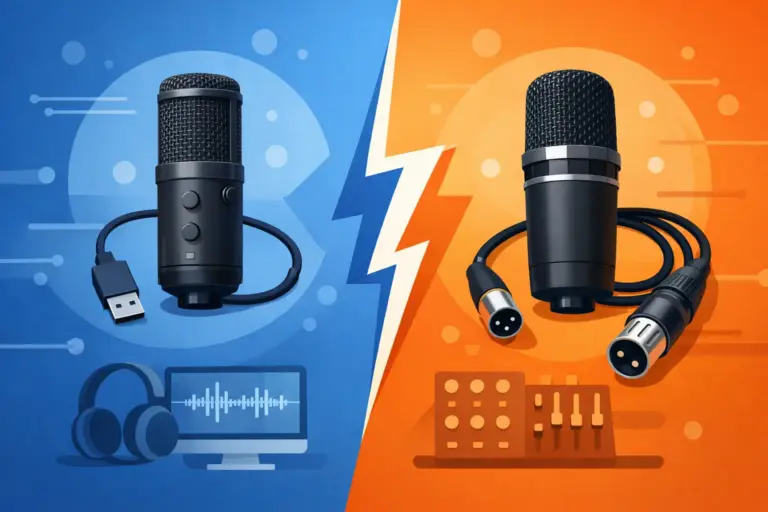
The Shure MV7+ is a premium hybrid-style option for creators who may eventually move into XLR gear. You can use it over USB now and retain the option to use XLR later with an audio interface. That flexibility makes it attractive for streamers building toward a more serious recording setup.
Its dynamic design helps manage room noise, and its voice-focused sound is well suited to live commentary. The price is higher, but it can prevent you from buying a cheaper USB microphone now and replacing it again when your channel grows.
How to Choose Between Budget and Premium Models
A budget USB microphone is enough when you stream casually, play with friends on Discord, or need a major improvement over a built-in laptop or headset mic. Prioritize cardioid pickup, a mute control, and a stable stand. The HyperX SoloCast and Razer Seiren V3 Mini fit this lane well.
Move into the mid-range when you want better controls, a stronger visual presence, headphone monitoring, or multiple pickup patterns. Models like the HyperX QuadCast, Blue Yeti, and Elgato Wave:3 give you more room to grow without making your setup complicated.
Premium microphones make sense when your voice is central to the content, your streaming room is noisy, or you want a microphone that can stay with you as your channel improves. Dynamic models such as the Logitech G Yeti GX, Blue Sona, and Shure MV7+ are especially valuable for untreated rooms.
Get Better Sound From Any USB Microphone
Even the best microphone cannot fix poor placement. Keep the microphone close to your mouth, usually six to10 inches away, and speak toward the correct side. Many side-address microphones are meant to be spoken into from the front, not the top. Check the logo placement before you go live.
Set your gain lower first, then raise it gradually while speaking at your normal streaming volume. If your audio meter constantly hits red, your voice will distort. A lower gain with the microphone closer to you usually sounds better than high gain from across the desk.
A boom arm, shock mount, and simple foam windscreen are affordable upgrades that can improve results fast. They reduce desk vibration, soften plosive sounds, and help you keep a consistent speaking distance. At Elcomputer Store, it makes sense to shop for these accessories alongside your mic instead of treating them as an afterthought.
Your viewers may forgive a missed shot or a rough first match, but they should never have to struggle to hear you. Pick the microphone that fits your room, your content, and your budget, then spend a few minutes dialing it in before the next time you hit Go Live.