
Best Magnetic Keyboards for FPS in 2026
A magnetic keyboard for FPS is built to solve one specific problem: movement inputs on normal keyboards can feel fixed, slow to reset, and harder to tune for fast strafing. In games like Valorant and CS2, that matters because a tiny delay in stopping or re-engaging movement can affect peek timing, burst accuracy, and consistency. By using Hall-effect sensing instead of metal-contact actuation, magnetic boards let players adjust exactly when a key activates and resets. That is why the best magnetic keyboard for FPS in 2026 is less about flashy specs and more about how cleanly it turns intent into movement.
What makes a magnetic keyboard better for FPS games?
Yes. Wooting and SteelSeries show why Hall-effect keyboards suit FPS: they measure key travel continuously, so movement keys in Valorant and CS2 can actuate and reset faster than on fixed-contact boards.
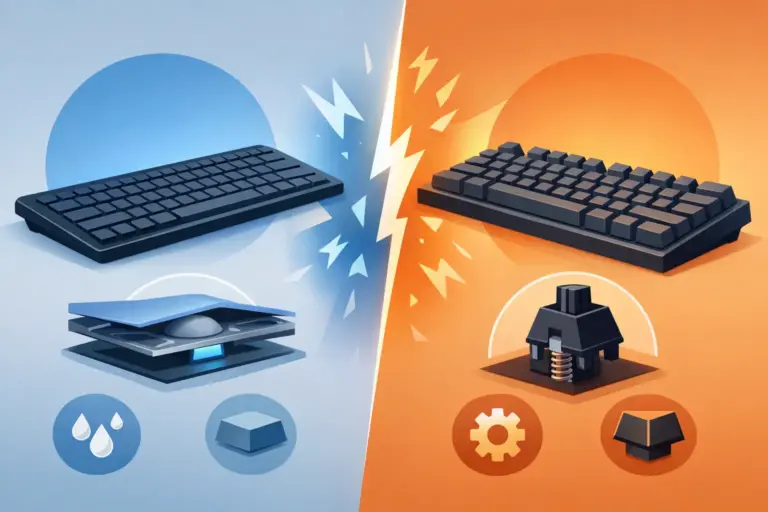
A standard mechanical switch usually has a fixed actuation point and a fixed reset point. A magnetic switch tracks travel distance through a sensor and magnet, which means the keyboard can decide, in software and firmware, exactly when a key turns on and off. That is what enables adjustable actuation and Rapid Trigger.
In FPS terms, this matters most for counter-strafing, AD peeking, jiggle movement, and repeated stop-start inputs. If a key resets the moment you begin releasing it, you can re-press it sooner and more consistently.
A common misconception is that a magnetic keyboard boosts raw aim. It does not. What it improves is movement control and input timing. If your biggest weakness is crosshair placement, the gain will feel smaller. If your weakness is movement discipline, the difference can be obvious within one or two sessions.
Magnetic keyboard vs mechanical keyboard for FPS: which one should you trust?
Magnetic wins for pure FPS movement. Corsair and Keychron Hall-effect boards reset faster than most Cherry-style mechanical switches because they avoid metal-contact debounce and let actuation move with the player.
That does not make traditional mechanical keyboards obsolete. A good mechanical board can still feel excellent, cost less, and offer broader switch choice. Many players also prefer the more familiar key feel and simpler software.
The real difference is how the switch behaves under repeated directional input. Mechanical switches are binary and depend on a physical contact point. Magnetic switches are position-based. If you need fast, repeatable left-right corrections, magnetic technology gives you more control. If you mostly play RPGs, MOBAs, or type all day, a good mechanical keyboard may still be the smarter buy.
There is one more point buyers often miss. Razer’s Huntsman V3 Pro 8K is a strong FPS keyboard, but it uses analog optical switches, not magnetic Hall-effect switches. It belongs in the same buying conversation because the practical goal is similar, even if the sensing method is different.
What are the best magnetic keyboards for FPS players in 2026?
The strongest 2026 picks come from Wooting, SteelSeries, Keychron, and a few aggressive value brands sold in Egypt. The right choice depends on whether you care most about top-tier tuning, easier local warranty, or the best price-to-performance ratio.
For most buyers, it helps to separate “best benchmark product” from “best realistic buy.” Importing a boutique keyboard can make sense, but local stock, verified warranty support, and easier replacement often matter more once you factor in shipping time and after-sales service.
- Elcomputer value pick: AULA Hero 68 HE: A strong local option for FPS buyers in Egypt, with 8 kHz polling, quoted 0.125 ms latency, adjustable actuation, and a compact 60% layout that leaves more room for low-sens mouse movement.
- Wooting 80HE: Still the benchmark for competitive Hall-effect FPS performance, with true 8 kHz polling, deep software tuning, Rapid Trigger, and one of the strongest reputations in tac-shooter communities.
- SteelSeries Apex Pro TKL Gen 3: The best mainstream alternative for players who want excellent latency, easy software, broad retail availability, and a more familiar TKL format.
- Keychron Q1 HE 8K: Ideal for players who want serious FPS features without giving up premium build quality, heavier chassis feel, and better typing acoustics.
- Corsair K70 PRO TKL Hall Effect: A solid choice for buyers already comfortable with iCUE, especially if they want a tournament-friendly TKL with Rapid Trigger and multi-action mapping.
- ASUS ROG Azoth 96 HE: Best suited to buyers who want high-end wireless flexibility, premium materials, and a layout that still keeps most productivity keys.
- AJAZZ AK680 MAX or Attack Shark X68 Pro HE: Good value-first options if budget matters more than prestige, though software polish and firmware support can vary.
If your main game is CS2 or Valorant, Wooting remains the safest pure-performance reference point. If you want a more attainable local purchase, AULA, AJAZZ, and other value HE boards can make far more sense.
How should you set actuation and Rapid Trigger for Valorant or CS2?
Start moderate. Wooting and AULA boards usually feel best for most players around 0.8 to 1.5 mm actuation, not the minimum 0.1 mm many ads push.
Step 1 is to tune movement keys first. Set W, A, S, and D shallower than the rest of the board, then leave utility keys deeper. That gives you faster strafing without turning every grenade or map key into a misfire risk.
Step 2 is to apply Rapid Trigger carefully. Use a low reset threshold on movement keys, then test whether you can stop cleanly without accidental reactivation. If your movement feels twitchy or noisy, raise the threshold slightly.
Step 3 is to split profiles by function. Movement keys can be aggressive, but Shift, Ctrl, Space, and number-row binds usually benefit from more conservative settings.
A common mistake is setting every key to the absolute minimum. That sounds fast on paper, but it often causes unintentional presses during tense rounds. In tac shooters, control beats theory.
Wooting 80HE vs SteelSeries Apex Pro Gen 3: which FPS keyboard is the better buy?
Wooting 80HE is the purer FPS tool, while SteelSeries Apex Pro Gen 3 is the easier mainstream buy. Wooting leads in tuning depth; SteelSeries wins on retail reach, comfort features, and simpler out-of-box setup.
Wooting’s advantage is software control. Wootility gives granular actuation tuning, strong Rapid Trigger behaviour, and features that serious FPS players tend to care about more than RGB. It is built around performance-first thinking.
SteelSeries answers with a more accessible package. The Apex Pro Gen 3 has excellent latency, 40 levels of adjustable actuation, improved dampening, and easier availability through mainstream channels. That matters if you want less hassle and faster local support.
The trade-off is clear. If you want the deepest possible movement tuning, Wooting is the stronger pick. If you want a high-end Hall-effect keyboard that feels familiar, includes comfort extras, and is easier to find, SteelSeries is easier to recommend.
If you are shopping in Egypt, this difference matters even more. Import-first brands can be brilliant, but local stock and service often tilt the real buying decision.
How can you test a magnetic keyboard setup before locking your profile?
Test with drills, not impressions. Aim Lab and CS2 workshop maps show quickly whether Rapid Trigger is improving your stop accuracy or just creating accidental movement noise.
Step 1 is to keep everything else fixed. Use the same mouse, the same sensitivity, and the same game settings. If you change both keyboard and mouse tuning together, you will not know what actually helped.
Step 2 is to run two simple checks. First, do repeated counter-strafe peeks and watch whether your first bullet lands more consistently. Second, do movement-heavy drills and count accidental inputs. If you are getting extra strafes, your actuation is too shallow or your reset is too sensitive.
Step 3 is to change one variable at a time. Adjust actuation first, then Rapid Trigger, then any SOCD-style or directional priority feature if the game rules allow it.
Pro tip: give each profile at least 30 to 60 minutes before judging it. A profile that feels “crazy fast” in five minutes can feel unstable after two matches.
Do 8 kHz polling and 0.1 mm actuation actually improve FPS performance?
Usually not by themselves. Wooting and ASUS prove that 8 kHz and 0.1 mm are useful ceiling specs, but stable firmware and sensible tuning matter more than the smallest number on the box.
Here is the practical math. A 1,000 Hz keyboard reports every 1 ms. An 8,000 Hz keyboard reports every 0.125 ms. That is a measurable improvement, but not every player will feel it, and not every game benefits equally. System latency is still shaped by the game engine, USB behaviour, frame time, and display response.
The same applies to ultra-shallow actuation. A 0.1 mm setting can be powerful for feather-light movement, but it can also cause false presses if you rest your fingers heavily. Many competitive players settle higher because it produces cleaner inputs.
A common misconception is that higher polling always means a faster experience. If the firmware is messy, or if the profile is badly tuned, 8 kHz alone will not save the board. Spec sheets matter. Implementation matters more.
How do you choose between 60%, 65%, 75%, and TKL for FPS gaming?
Most FPS players should begin with 60% or TKL. Wooting-style compact boards maximise mouse space, while TKL models from Corsair and SteelSeries keep function keys and navigation without the width of a full-size board.
Step 1 is to look at mouse space, not keyboard trend videos. If you play low sensitivity and make wide arm sweeps, smaller layouts help immediately. That is why 60% and 65% boards remain so common in competitive setups.
Step 2 is to be honest about your non-gaming use. If you need F-keys for work, screenshots, Discord binds, or creative apps, a TKL or 75% board can be more practical. Saving a few centimetres is not worth constant frustration.
Step 3 is to think about desk flow. If your monitor stand, mouse pad, and audio gear already squeeze your space, a 60% makes more sense. If your desk is wide and you use the same PC for gaming and office tasks, TKL often feels like the best balance.
A common mistake is assuming smaller is always better. The best FPS layout is the one that frees mouse movement without breaking your daily workflow.
Are budget magnetic keyboards from AULA, AJAZZ, and Attack Shark good enough for ranked play?
Yes, many budget magnetic keyboards are now good enough for serious ranked play. AULA and AJAZZ offer 8 kHz-class specs, Rapid Trigger, and adjustable actuation at a price far below Wooting or ASUS.
That said, the trade-offs are real. Budget boards often vary more in software quality, firmware maturity, stabiliser tuning, and documentation. The headline spec can look elite while the overall experience feels less polished.
If your budget is tight and your priority is FPS performance per pound, a good value Hall-effect keyboard can be smarter than a premium traditional mechanical board. If you care about long-term refinement, better acoustics, and software stability, the premium models still justify their price.
Pro tip: pay close attention to how the keyboard handles profiles, calibration, and updates. On a magnetic board, software is part of the product. If the software is weak, the switch technology cannot reach its full value.
What should buyers in Egypt check before ordering a magnetic keyboard online?
In Egypt, warranty terms and layout matter almost as much as the switch itself. Elcomputer and official distributors are often a safer choice than a cheaper import listing if you need firmware help, replacement support, or warranty handling.
Before placing the order, check the details that actually affect daily use:
- Layout and legends: Most FPS buyers should confirm ANSI, English legends, and standard key sizes before ordering keycaps or replacement parts.
- Polling conditions: Many boards advertise 8 kHz, but only in wired mode. If you want wireless, verify the real mode limits first.
- Software access: Make sure the brand’s launcher or web software works cleanly in your region and supports profile saving on-board.
- Warranty path: Active assistance with distributors is more useful than a vague “seller warranty”, especially for dead-on-arrival cases or firmware issues.
- Return and compliance: A retailer that follows consumer protection rules, clear invoicing, and secure checkout lowers the risk if the board arrives with defects.
If the keyboard is meant for competitive FPS, buy the board you can actually support and tune over time, not just the one with the flashiest numbers.