Best Ergonomic Mice for Daily Use
Long hours on a computer can turn a small hardware choice into a daily comfort problem. The best ergonomic mouse for work helps reduce awkward wrist rotation, unnecessary shoulder reach, and constant grip tension during office tasks, design work, and remote meetings. That matters because a standard flat mouse often keeps the forearm pronated for hours, which can add strain over time. A good ergonomic model solves that by matching posture, hand size, and workflow instead of focusing only on price or branding.
What makes the best ergonomic mouse for work?
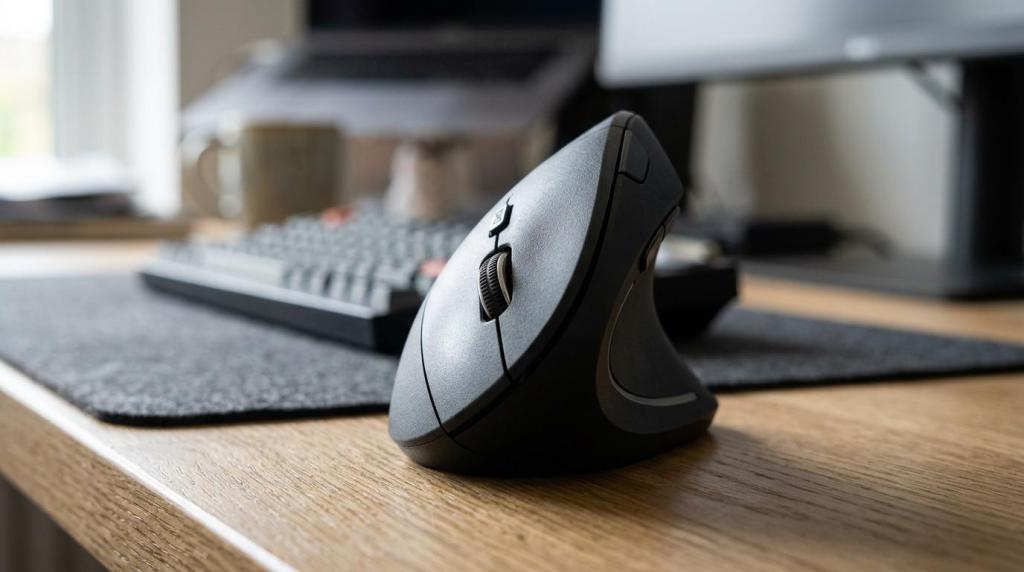
The best ergonomic work mouse keeps the wrist neutral and the grip relaxed. Logitech Lift and Rapoo EV250 show the two main routes: a refined 57° vertical design or a simpler 60° office-focused shape.
A strong work mouse is not only about comfort marketing. It should support a neutral wrist angle, let the palm rest naturally, and keep the main buttons easy to reach without finger stretch. OSHA workstation guidance repeatedly points to neutral wrist posture and reduced reach as core principles, so the mouse should sit close to the body and avoid side-bending at the wrist.
After those basics, daily-use quality comes from fit and friction. If the shell is too large, the hand overreaches. If it is too small, the fingers curl and grip harder. Sensor quality, scroll-wheel feel, quiet clicks, and reliable wireless performance also matter because office users repeat these actions thousands of times each week.
A quick way to judge quality is to check four areas:
- Posture: neutral wrist, low forearm rotation, easy palm support
- Fit: hand size match, no forced fingertip stretch
- Control: accurate tracking, consistent scroll, reachable side buttons
- Ownership: battery life, warranty support, return policy in Egypt
How should hand size and grip style guide the choice?
Hand fit decides comfort more than price. Logitech MX Vertical suits many medium to large hands, while Logitech Lift tends to fit small to medium hands better.
A practical selection process works in three steps. Step 1 is hand length and palm width. A smaller hand usually does better with a compact vertical shell like Lift, while a larger hand often needs the fuller support of MX Vertical or a larger contoured productivity mouse.
Step 2 is grip style. Palm grip benefits most from ergonomic shapes because the hand rests on the shell. Claw grip can work, but the ergonomic benefit drops if the fingers stay highly bent. Fingertip users often prefer lighter mice or trackballs because many ergonomic shells are built for palm support first.
Step 3 is task duration. If a worker spends six to ten hours on spreadsheets, browser tabs, and email, hand support matters more than speed. If light gaming happens after work, a contoured productivity mouse may balance comfort and familiarity better than a full vertical design.
A common mistake is buying the biggest mouse under the assumption that more support is always better. Oversized shells often create shoulder tension and button reach problems.
What are the best places in Egypt to buy an ergonomic mouse for work?
Trusted sellers matter as much as the mouse itself. Elcomputer and Amazon.eg are useful starting points because stock, warranty handling, and return clarity affect long-term value.
Ergonomic mice are not stocked as widely as regular office mice, especially vertical and trackball models. That makes seller quality important. A buyer in Egypt should look for clear specs, real stock status, verified warranty terms, and a simple return process in case the shape does not suit the hand after a few days.
- Elcomputer: strong option for ergonomic and productivity peripherals, with competitive pricing, verified warranty assistance, and fast checkout for buyers in Egypt
- Official brand stores: useful for Logitech or Razer models when the buyer wants the latest release and direct software support details
- Large marketplaces: Amazon.eg and noon can help with broad availability, but listings should be checked carefully for warranty source and return conditions
- Local computer retailers: helpful when same-day pickup or hands-on inspection matters more than broad selection
- Office-tech chains: practical for simpler wireless office mice, though premium ergonomic shapes are often limited
Is a vertical mouse better than a standard mouse for office work?
Yes, a vertical mouse is often better for office comfort when forearm rotation is the problem. Logitech Lift and Rapoo EV250 reduce pronation compared with a flat mouse, but they also demand an adaptation period.
The main gain of a vertical mouse is posture. A flat mouse keeps the palm facing downward, which rotates the forearm. A vertical mouse moves the hand closer to a handshake position. Popular models sit around 57° to 60°, and that change can reduce strain for many office users during long sessions.
The trade-off is familiarity. A flat mouse feels instantly normal because most people have used one for years. A vertical mouse can feel slow or awkward for the first two to seven days, especially when selecting small targets or dragging files. That does not mean the mouse is wrong. It may simply need a short adjustment period.
Still, vertical is not automatically best. If the hand is very small, the shell may feel tall and unstable. If fast cursor movement is part of the job, a contoured productivity mouse can sometimes be the better middle ground.
Should a work user choose a trackball or a vertical mouse?
A trackball wins when desk space or shoulder movement is the real constraint. Logitech MX Ergo S and Kensington Pro Fit cut arm travel, while vertical mice feel more natural to most first-time buyers.
A trackball keeps the device stationary and moves the cursor with a thumb or fingers. That reduces arm movement, which is useful on crowded desks, compact workstations, or setups where shoulder reach is the main complaint. It can also help users who switch between keyboard and mouse constantly because the hand stays in one place.
A vertical mouse is easier to learn because it still behaves like a regular mouse. It changes posture without changing the basic movement pattern. That is why many first-time ergonomic buyers adapt to vertical faster than to trackball.
The trade-off is where the load goes. Trackballs reduce shoulder movement but can increase thumb use. Vertical mice reduce pronation but still require moving the device. If shoulder fatigue appears after long reach, trackball deserves priority. If wrist rotation feels like the issue, vertical is usually the cleaner first choice.
How can someone set up an ergonomic mouse correctly at the desk?
Correct setup matters as much as the hardware. OSHA guidance and compact keyboards both point to the same fix: keep the mouse close, keep the wrist straight, and avoid outward shoulder reach.
Step 1 is placement. The mouse should sit beside the keyboard, not far outside it. Many full-size keyboards push the mouse too far right because of the numpad. A useful tip is to pair the mouse with a compact or tenkeyless keyboard when desk space allows.
Step 2 is arm position. The elbow should stay near the body at roughly 90 to 110 degrees, with the forearm supported by the desk or chair arm when possible. The wrist should remain straight, not bent up, down, or sideways.
Step 3 is pointer effort. If a worker has to sweep the whole arm to cross the screen, pointer speed is probably too low. If the cursor overshoots constantly, it is too high. The goal is small, relaxed movements, not twitchy speed.
Many users blame the mouse when the real problem is reach. A premium mouse placed too far away will still create strain.
How important are DPI, buttons, and wireless features for work?
DPI and buttons matter, but not in the way many buyers assume. Logitech MX Vertical and Rapoo EV250 prove that 1600 to 4000 DPI is usually enough for work, while extra buttons can save hundreds of clicks a day.
Higher numbers sound impressive, but office work rarely needs gaming-grade sensitivity. What matters is matching cursor speed to screen size and desk movement. On a single 1080p monitor, 800 to 1600 DPI is often enough. On dual screens or a 4K display, 2000 to 4000 DPI can reduce arm travel and keep motions smaller.
Buttons deserve more attention than many buyers give them. Back and forward buttons speed up browser work, while app shortcuts can help in Excel, Photoshop, and communication tools. Wireless also matters for ergonomics because it gives more freedom to place the mouse exactly where the arm rests naturally.
A useful rule is simple:
- 800 to 1600 DPI: solid for one-screen office work
- 2000 to 4000 DPI: better for dual monitors, 1440p, and 4K setups
- Extra buttons: worth paying for when browser and app switching happens all day
- Wireless: best for flexible placement, while wired removes battery concerns
A common misconception is that higher DPI is always better. For office tasks, unstable cursor control is usually worse than low sensitivity.
How can a buyer test an ergonomic mouse during the first week?
A one-week test shows real comfort faster than a spec sheet can. Logitech Lift and Razer Pro Click V2 Vertical may both feel strange on day one, yet only one will suit a given hand and workflow.
Step 1 is fit testing on the first day. The palm should rest without squeezing, and the index finger should hit left click naturally. If the buttons require reaching or the thumb feels unsupported, the shape is likely wrong.
Step 2 is fatigue testing over two to three work sessions. Mild unfamiliarity is normal. Sharp thumb strain, finger numbness, or constant wrist extension is not. If discomfort increases each day instead of easing, that is a clear sign to return or exchange the mouse.
Step 3 is workflow testing by the end of the week. A good mouse should improve routine actions, not only posture. If browsing, copy-paste work, and scrolling feel easier, the mouse is probably a keeper. If comfort improves but productivity drops hard, a contoured model may be a better compromise.
Can an ergonomic mouse prevent wrist pain or RSI by itself?
No, an ergonomic mouse alone does not stop RSI. OSHA guidance and university ergonomics labs both stress workstation fit, movement breaks, and grip force alongside the mouse shape.
This is one of the biggest buying myths. A vertical or trackball mouse can support better posture, but it is not a medical guarantee against carpal tunnel symptoms, tendon irritation, or general wrist pain. Repetitive strain issues usually come from a mix of factors: mouse shape, desk height, keyboard reach, break frequency, and how tightly the hand grips.
If the workstation is poor, the benefit of a better mouse shrinks fast. If the keyboard is too high, the wrist still extends. If the mouse sits far away, the shoulder still reaches. If the user grips too hard during stress, even an ergonomic shell can become tiring.
The practical takeaway is clear. If pain is mild and linked to long work sessions, a better mouse and better setup can help. If numbness, night pain, or persistent weakness appear, a clinician should assess the issue.
Which ergonomic mouse type suits common work profiles in Egypt?
Different jobs need different shapes. Logitech Lift, Rapoo MT760L, and Logitech MX Ergo S each suit a distinct work pattern, from quiet office admin to multi-monitor analysis.
Work context matters more than trend lists. A vertical mouse fits many general office users because it targets posture first. A contoured productivity mouse suits workers who need precision, dual scroll wheels, or faster adaptation. A trackball suits desks with limited space or users who want to reduce arm movement as much as possible.
For buyers in Egypt, availability and warranty support should sit beside comfort on the checklist. Niche models can be excellent, but only if replacement, software access, and return handling are clear.
A simple profile map helps narrow the choice:
- Office admin and remote work: silent vertical mouse with 5 to 6 buttons
- Finance, coding, and multi-monitor tasks: contoured productivity mouse with 2000 to 4000 DPI
- Small desk or shoulder reach issues: thumb trackball
- Laptop commuter: Bluetooth ergonomic mouse with light weight and easy switching
- Work plus casual gaming: ergonomic-shaped productivity or gaming mouse, not a heavy full vertical model by default